How to Check a Tweet From a Link, Even After the Account Is Gone
A tweet link is the most precise thing you can start from: it points at exactly one tweet, even when the account behind it has been deactivated, suspended or deleted. If a snapshot of that tweet’s page was saved while it was public, the link is enough to find it. This guide shows how to read the link, check every version of it, and make sense of what comes back, including the common case where the honest answer is that nothing was saved.
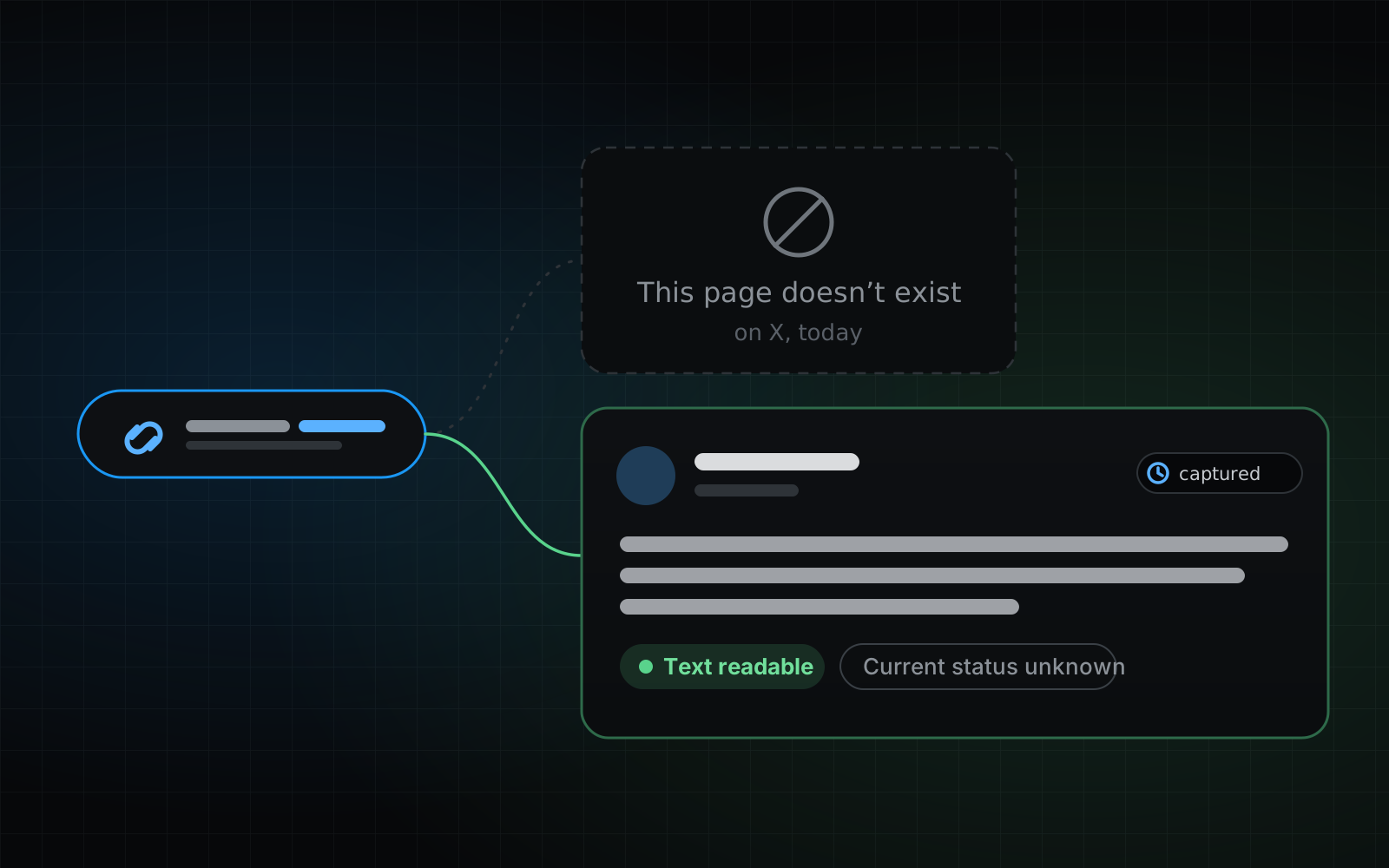
Does a tweet link still work after the account is gone?
On X, a link to a tweet from a deactivated, suspended or deleted account usually opens a notice such as “This page doesn’t exist” or “Account suspended”. The link itself hasn’t stopped meaning something, though. It is still the exact address of one tweet page, and saved snapshots are filed under the address of the page they were saved from.
That makes a link the best starting point you can have. It names a single tweet, so there is nothing to search through: if a snapshot of that page was saved while it was public, the check can find it, whether or not the account is still there.
What’s inside a tweet link?
A tweet link has five parts, and only some of them matter for the lookup. Knowing which helps when a link is messy, or when you have to rebuild one from a screenshot.
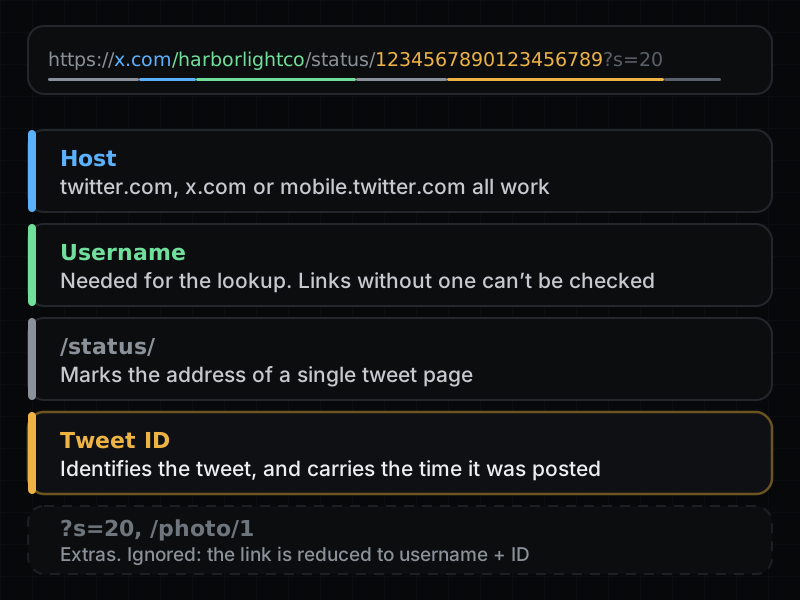
- Host: links on twitter.com, x.com and mobile.twitter.com are all accepted, and so are their “www.” forms.
- Username: the account that posted the tweet, as it appears in the link you have. The check needs it, because snapshots are filed under it.
- The tweet ID: the long number after /status/ is the tweet’s identity. Modern IDs (everything since about 2011) also contain the time the tweet was posted, which is how a result can show a posting date even when the saved page doesn’t.
- Extras: anything after the ID, such as “?s=20” or “/photo/1”, is ignored. The link is reduced to the username and the ID before anything is looked up.
How do you check a link?
Use the free link check. It needs no X account and no sign-in.
- 01Copy the link exactly as you have it. Links shared from the X app, with their extra “?s=20” tail, work as they are.
- 02Paste it into the check and run it. The search can take up to a minute.
- 03Read the best copy at the top: the tweet’s text, any image that was saved, and the time the snapshot was captured.
- 04Then scroll to the per-version list. It shows every link version that was checked, how many captures each has, and what they actually contain.
Why does one tweet have several saved versions?
X renamed twitter.com to x.com, but the old addresses never stopped working. One tweet has therefore been reachable at several addresses, and the check looks at four of them: https://twitter.com/…, http://twitter.com/…, https://x.com/… and mobile.twitter.com/…. A snapshot saved under one address is not filed under the others, so each version is checked and reported on its own.
Their contents often differ. Pages saved since mid-2023 frequently hold only X’s app frame, so a recent tweet can come back as a bare frame under x.com and fully readable under twitter.com. The guide on why recent tweets don’t show up yet explains the timing.
How do you read the four results?
Every link version gets exactly one of four labels. They mean different things, and only the first gives you the tweet itself.
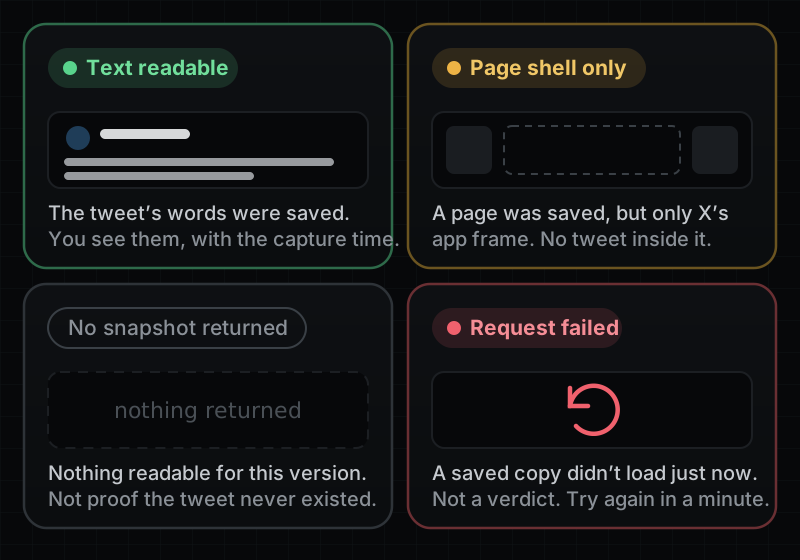
- Text readable: a snapshot contains the tweet’s words. The best one is shown at the top with its capture time.
- Page shell only: a page was saved, but it holds only X’s app frame. Look at the other versions; the twitter.com one is often the readable one.
- No snapshot returned: nothing readable came back for this version, usually because no copy was saved under it. It says nothing about whether the tweet ever existed.
- Request failed: a saved copy didn’t load just now. That is a reason to retry, not an answer. Run the check again in a minute.
What does a readable snapshot prove?
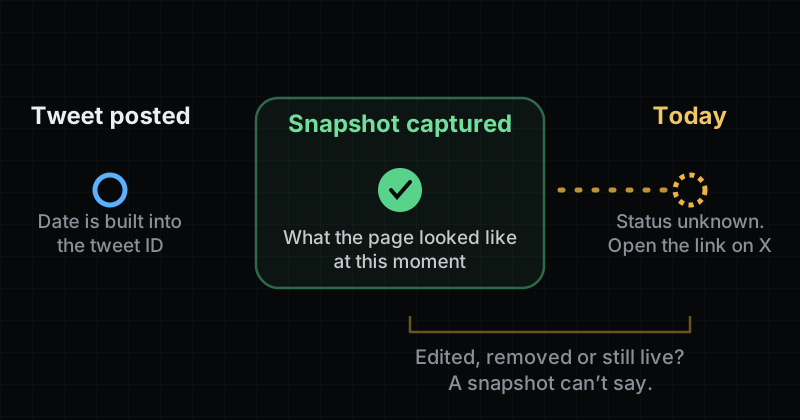
A snapshot shows the tweet page as it looked at the moment it was saved, and every result shows that capture time. That is all it shows.
It can’t tell you whether the tweet was edited or removed afterwards, or whether it is still live, which is why every readable result is marked “Current status unknown”. To see today’s state, open the link on X. A snapshot can also miss context: the replies around the tweet, a quoted tweet, or an image that wasn’t saved.
- If you need to rely on a result, write down the tweet ID, the username in the link and the capture time.
- Keep a screenshot of the result page, including which link version the copy came from.
What if you only have part of a link?
The check needs a username and a tweet ID. Depending on what you have:
- A username and a tweet ID: build the link yourself, as x.com/username/status/ID. It doesn’t need to be a perfect copy of the original.
- An /i/web/status/ link or only an ID: these carry no username, so they can’t be checked. Look for the username where you found the link: the post it was shared in, a reply, a quote tweet or a screenshot that shows the handle.
- Only a username, perhaps with a rough idea of when the tweet was posted: search the account instead. The free preview shows how many of its tweets have saved snapshots, the date range they cover and a few readable samples. In the full archive you can narrow the list by words and posting date.
- A username you think has changed: accounts get renamed, and a snapshot is filed under the username in the address when it was saved. If you have another copy of the link with a different username, check that one as well.
What if nothing comes back?
No result is not the same as a tweet that never existed. The usual reasons, roughly from easiest to fix to hardest:
- The link is incomplete. A tweet ID that lost a digit when it was copied points at a different tweet or at none. Copy it again.
- The tweet is recent. Snapshots are saved after the fact, so the newest tweets are the least likely to have one. Check again later: new snapshots keep being added over time.
- The username doesn’t match. See the point about renamed accounts above.
- It was never saved. Many tweets never were, and then there is nothing to find.
Quick answers
Does the account have to be gone for this to work?
No. The check only looks at whether a snapshot of that tweet’s page was saved. It works the same for a tweet from an active account and one from a deactivated, suspended or deleted account.
Do I need an X account or to sign in?
No. The link check is free, needs no sign-in and never asks for X credentials.
Can it find a tweet from a protected account?
No. Protected tweets were never on public pages, so they aren’t in saved snapshots.
Why is a tweet readable under twitter.com but not under x.com?
One tweet has a different page address under each hostname, and pages saved under x.com since mid-2023 often hold only X’s app frame. The twitter.com copy of the same tweet is frequently the readable one.
Does “Text readable” mean the tweet was deleted?
No. It means a snapshot containing the tweet’s text exists. We never check X for a tweet’s current state, so every result is marked “Current status unknown”. Open the link on X to see whether it is still live.
Does checking a link cost anything?
No. Checking a link is free. Paying is only an option if you want to unlock the full archive for a whole account, which is a separate feature with search, filters and export.